
Download Typing Agent – Typing, Education, School, Student, Learning, Fun, Games, K-12
Overview
Typing Agent is a desktop application designed to help students develop essential keyboarding and typing skills in an engaging, game-based learning environment. Built specifically for K-12 educational settings, the software supports both Windows and Mac platforms and is part of the TypingAgent.com ecosystem. The application is intended for use by students who already have an existing Typing Agent 4.0 account through their school or school district.
It serves as a dedicated tool to access student accounts, track progress, and participate in interactive lessons and assessments. The software aims to address the growing need for digital literacy by making typing practice both effective and enjoyable. Its core purpose is to enhance student engagement through a “Secret Agent” themed interface, which transforms routine keyboarding exercises into immersive experiences.
This approach aligns with educational research suggesting that gamified learning improves retention and motivation. The app is particularly suited for students in elementary through high school, as well as teachers who manage classroom typing programs. Real-world usage includes daily typing practice, classroom assignments, and teacher-led progress monitoring.
The developer, TypingAgent.com, has focused on creating a tool that bridges the gap between academic skill-building and student engagement.
Key Features & Capabilities
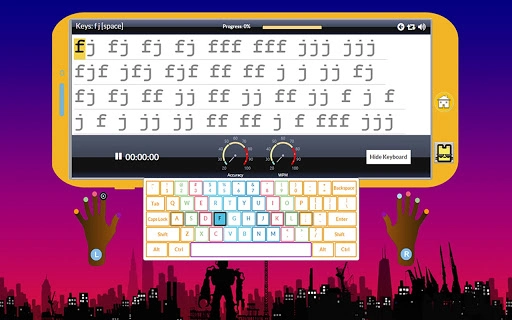
- Secret Agent-Themed Learning Environment: The software features a modern, visually appealing interface with a spy-themed narrative that motivates students through role-playing and achievement tracking.
- Adaptive Learning Curriculum: Lessons are organized into logical units and can be customized based on grade level and skill progression, ensuring content is appropriate for learners from K-3 to higher grades.
- Interactive Lessons with Visual Feedback: Animated hands and keyboard demonstrations guide proper finger placement and typing technique, enhancing muscle memory and accuracy.
- Agentbook Social Network: A built-in communication platform where students and teachers can interact, respond to questions, and share creative writing, fostering a collaborative learning atmosphere.
- Customizable Testing Tools: Teachers can set timed tests between 1 and 20 minutes, customize test parameters, and review scores after each attempt for detailed performance analysis.
- Progress Tracking & Reporting: The software allows educators to view the last five scores per lesson or test, generate class-wide reports, and monitor individual student advancement over time.
- Classroom Management Features: Teachers can assign students to groups, reset data for new academic years, move students between classes, and manage self-registration and password setup.
User Interface, Workflow & Performance
The user interface of Typing Agent is structured around an app-style navigation system, designed to be intuitive for both young learners and adult users. The layout emphasizes visual clarity, with clearly labeled menus, consistent icons, and a responsive design that adapts to different screen sizes. Navigation is streamlined through a central dashboard that provides quick access to lessons, tests, Agentbook, and personal progress tracking.
The workflow is designed to minimize friction—students can log in, select a lesson, complete it with real-time feedback, and receive rewards without needing to navigate complex menus. The developer did not specify resource usage details, so performance behavior in terms of CPU or RAM consumption remains unknown. However, the application’s 25.6 MB installation size suggests a lightweight footprint, which may contribute to smooth operation on standard educational devices.
Stability and responsiveness are expected to be consistent with typical desktop applications of similar scale. General performance observations are based on standard software behavior patterns. The software appears to be optimized for educational use, prioritizing usability and accessibility over advanced technical features.
Compatibility & System Requirements
Typing Agent is compatible with both Windows and Mac operating systems, making it accessible to a broad range of school environments. The software version is 4.0, and the installation file size is 25.6 MB. The developer did not provide additional system requirements, so specific hardware specifications such as processor speed, RAM, or disk space are not available.
Platform compatibility information is limited to the operating systems listed. Users should ensure their devices meet the minimum standards expected for running modern web-based desktop applications. The software is designed for use in educational institutions and may require administrative privileges for installation in some school environments.
For users without existing accounts, access to the application is not possible, as it requires a valid TypingAgent.com 4.0 account through a school or district. The application is intended for offline use after login, though certain features may require an internet connection for synchronization and updates.
Pros and Cons
Pros
- Engaging, game-based learning environment that boosts student motivation
- Customizable curriculum tailored to different grade levels and skill sets
- Integrated social platform (Agentbook) for teacher-student interaction
- Comprehensive progress tracking and reporting tools for educators
- Lightweight installation size (25.6 MB) suitable for school devices
- App-style navigation familiar to modern users
Cons
- Requires an existing school-based TypingAgent.com 4.0 account to use
- Exact system requirements were not listed
- Performance details such as CPU or RAM usage were not specified
- May require internet connectivity for full functionality
- Limited to K-12 educational use; not designed for general adult learners
FAQ Section
Is Typing Agent available for free?
Yes, the software is available at no cost. It is offered as a free tool for students and teachers within school and school district programs.
What operating systems does Typing Agent support?
Typing Agent is compatible with both Windows and Mac operating systems.
Do I need an account to use the software?
Yes, users must have an existing TypingAgent.com 4.0 account through their school or school district to access the application.
Is the software safe to use in schools?
The software is designed for educational use and operates within a secure, school-managed environment. It does not collect personal data beyond what is necessary for account management.
Can I use Typing Agent offline?
While the application can be used after login, certain features such as progress syncing, message delivery, and test updates may require an internet connection.
Final Thoughts + CTA
Typing Agent stands out as a well-designed, student-focused tool that successfully blends education with entertainment. Its unique “Secret Agent” theme, combined with a modern interface and robust classroom management features, makes it a compelling choice for K-12 educators seeking to improve typing proficiency. The software’s emphasis on engagement, customization, and teacher control creates a powerful learning ecosystem.
While it is limited to users with school-issued accounts, this ensures a secure, controlled environment ideal for academic settings. For schools aiming to modernize keyboarding instruction and increase student participation, Typing Agent delivers tangible value. Its lightweight design and cross-platform support further enhance its practicality in diverse school environments.
Download Typing Agent now to transform typing practice into an exciting, rewarding experience for every student.







